myPathways
Students may be eligible to earn credits based on previous education or applicable workplace experience.
Credit Transfer at Sheridan
Credit Transfer allows Sheridan students to apply previously acquired learning credits or workplace experience towards their current program of study.
Available Credit Transfer options
-
Advanced Standing: the review and granting of credit for a previously completed course from an approved recognized postsecondary institution (an external institution or organization that is a recognized member of a provincial, national or international accrediting body)
-
Prior Learning Assessment and Recognition (PLAR): a process which uses a variety of tools to help learners reflect on, identify, articulate and demonstrate past learning which has been acquired through work experience, unrecognized training, independent study, volunteer activities, and hobbies and which is not recognized through formal transfer of credit mechanisms
- Sheridan to Sheridan credits:
-
Course equivalency: a course that is considered equal in content as demonstrated through the learning outcomes to another course
- Course substitution: the granting of credits for previously completed Sheridan courses with equivalent content
- Block Transfers: this designation is used to identify a series of courses which have been used to satisfy a transfer agreement. This designation excludes the courses from the calculation of the GPA
- Diploma to diploma: credits granted based on an agreement of pathway
- Degree completion: credits granted based on an agreement of pathway
- General elective to breadth elective (for 101 degree students only): elective block transfer of credits
Browse the tabs below to see more details about each of the Credit Transfer options:
- Advanced Standing
- Prior Learning Assessment & Recognition
- Sheridan to Sheridan Credits
- Block Transfers
Advanced Standing
Advanced Standing is the transfer of credits earned at another recognized postsecondary institution towards a Sheridan credential. Before applying for Advanced Standing students need to determine:
- If they are eligible for Advanced Standing
- how Advanced Standing might impact their program of study
- how Advanced Standing may affect their finances
The use of Advanced Standing credits is subject to the requirements of Sheridan's Credit Transfer Policy and Graduation Policy. The Sheridan Graduation Policy allows you to transfer up to 75% of the required course load.
Students registered in post-secondary programs who wish to apply for Advanced Standing will need to use Sheridan's online service. See the How to Apply section below.
Please note: information regarding Advanced Standing is subject to change.
Requirements and When to Apply
Requirements
Candidates must have achieved a minimum course grade of 60% or the minimum pass for promotion within the program; whichever is higher, for a request for advanced standing to be considered.
Access to the Advanced Standing Application
New students will be able to access the online Advanced Standing application after their fee payment has been processed.
The application becomes available based on your start term:
- New students starting in the Fall, the online application opens in late July.
- New students starting in the Winter, the online application opens in late November.
- New students starting in the Spring/Summer, the online application opens in late March.
- Returning students that have not made a fee payment for the following term, or students that are not returning, may apply for advanced standing until the last day of classes of the current term.
Important Considerations
Before applying for Advanced Standing it is important to take into account the impact that a successful application will have on your academic and financial status, particularly if it effects your course load.
- Advanced Standing will be awarded for the term in which the application was submitted. If advanced standing is granted, it may fulfill future term requirements. Students are advised to review their academic requirements page in their student centre account.
- Dropping to a part-time status can impact your ability to access OSAP funds, bursaries and other forms of financial support. If you have questions about the impact to your funding eligibility, please email Financial Aid & Awards at fin.aid@sheridancollege.ca.
- Students will not receive a refund for courses where Advanced Standing has been approved
- Students applying for Advanced Standing are advised not to drop courses until approval has been granted by the College.
- If you have been granted Advanced Standing after the fifth day of term you will not be able to add a new course to your timetable to replace that course.
Minimum Grade Requirements
| Program Code | Course ID | Subject | Course Description | Min Points |
| PPHTN | 003511 | CHEM | Adv Phar Sterile Prep Theory & Lab | 3.00 |
| PPHTN | 003507 | BIOL | Adv. Body Sys & Disease States | 3.00 |
| PPHTN | 003504 | HEAL | Advanced Community Pharm. Disp | 3.00 |
| PPHTN | 003519 | PHAR | Advanced Pharmacology | 3.00 |
| PPHTN | 006675 | PHAR | Community Pharmacy Practices | 3.00 |
| PPHTN | 003513 | HEAL | Inst'l Pharm Disp Theory & Lab | 3.00 |
| PPHTN | 003510 | HEAL | Inst'l Pharmacy Practice | 3.00 |
| PPHTN | 003547 | FLPL | Institutnl Pharm Clinical Pr | 4.00 |
| PPHTN | 001292 | HEAL | Intro Community/Pharm Dispens | 3.00 |
| PPHTN | 003521 | BIOL | Intro to Body Systems/Disease | 3.00 |
| PPHTN | 003503 | PHAR | Intro to Pharmacology | 3.00 |
| PPHTN | 003501 | CHEM | Introd. to Pharmaceutical Comp | 3.00 |
| PPHTN | 003505 | HEAL | Long Term Care Concepts | 3.00 |
| PRPHA | 003524 | MATH | Pharmacy Math | 3.00 |
| PPHTN | 003524 | MATH | Pharmacy Math | 3.00 |
| PPNSG | 003524 | MATH | Pharmacy Math | 4.00 |
| PPHTN | 003506 | ACCG | Pharmacy Mgt & Inventory Contr | 3.00 |
| PPHTN | 003502 | HEAL | Self-Meds & Comp'y Therapies | 3.00 |
| PPHTN | 003517 | CHEM | Spec Extemporaneous Compound'g | 3.00 |
| PPHTN | 003518 | CHEM | Sterile Prep & Aseptic Techniq | 3.00 |
| PPHTN | 008134 | PHAR | Integ Practice & Career Devel | 3.00 |
| PVETT | 16532 | MATH | Pharmacy Math | 4.00 |
University/College Courses with Multiple Equivalencies
In some cases, credits earned from year long courses at other universities/colleges are evaluated as equivalent to two Sheridan courses. Below is the list of multiple equivalencies:
Taking Courses at Other Institutions for Sheridan Credits
Courses Older than Five Years
Exempt Programs & Courses
The following Sheridan joint and intensive programs are excluded from online Advanced Standing:
| PAAAH | Art and Art History (Honours Bachelor of Arts) |
| PBDES | Honours Bachelor of Design |
| PCCIT | Communication, Culture and Information Technology |
| PECEI | Early Childhood Education Intensive |
| PEDSI | Educational Support Fast-Track Intensive |
Co-op placements are not eligible for Advanced Standing.
Continuing Education Students
Sheridan's Online Application for Advanced Standing is only available to post-secondary students. Students in a Continuing and Professional Studies (CAPS) program must apply for Advanced Standing through CAPS.
Students with International Education
All students with International transcripts wishing to apply for Advanced Standing must provide verified transcripts and evaluation reports from either World Education Services (WES) or the International Credential Assessment Service of Canada (ICAS). Individual course outlines from the year the course was completed are required in order to have the Advanced Standing request processed. If you do not have copies please contact your previous institution to request outlines.
Only the following forms of evaluation report will be accepted as part of the Advanced Standing Application:
- Course-by-Course Report (WES)
- Postsecondary Comprehensive Report (ICAS)
Please note: General Report or Document-By-Document Reports will not be accepted for Advanced Standing.
International Application Help
- If you have submitted official transcripts from another post secondary institution in Canada to the International Centre during the application process, it is not necessary to resubmit them for the online Application for Advanced Standing.
- If you have submitted a Comprehensive or Course-By-Course report to the Admissions Office during the application process, and have applied for Advanced Standing through the online application, please email pathways@sheridancollege.ca. Submitting duplicate copies of the report is not necessary.
- Students with international education should provide the best information to support the application. Students should enter the Course Subject and Course Number when this information is provided on the transcript, however, when not available, enter the first few letters of the course name as the course subject code, and the line number on the evaluation as the course number code. Enter the full course title, grade, and credit value from the evaluation report.
For more information send email to: pathways@sheridancollege.ca
Ontario College Course Outline Links
Course Outlines & Advanced Standing
When applying for Advanced Standing for a non-evaluated course you must include a detailed course outline documenting the learning outcomes and the length of the external course. Below are some links to the Course Outline pages at other Ontario Colleges for your convenience and reference.
- Algonquin College
- Cambrian College
- Canadore College
- Centennial College
- course outlines are linked from the program pages
- Collège
Boréal
- contact the Admissions Office & Registrar
- Conestoga College
- contact the Credit Transfer Office
- Confederation College
- contact the Academic School associated with your program
- Durham College*
- Fanshawe College
- Fleming College
- George Brown College
- Georgian College
- Humber College
- La Cité collégiale*
- Lambton College
- Loyalist College*
- Mohawk College
- Niagara College
- Northern College*
- Sault College
- Seneca College
- Sheridan College
- St. Clair College*
- St. Lawrence College*
* No specific course outline request info available. Contact the institution for more info.
How to Apply
Before starting your application make sure that you satisfy the requirements for Advanced Standing. You must also take into account the academic and financial implications of a successful Advanced Standing request.
- Login to myStudent
Centre
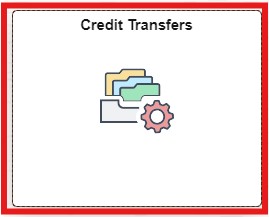
Click on the Credit Transfers tile in your dashboard
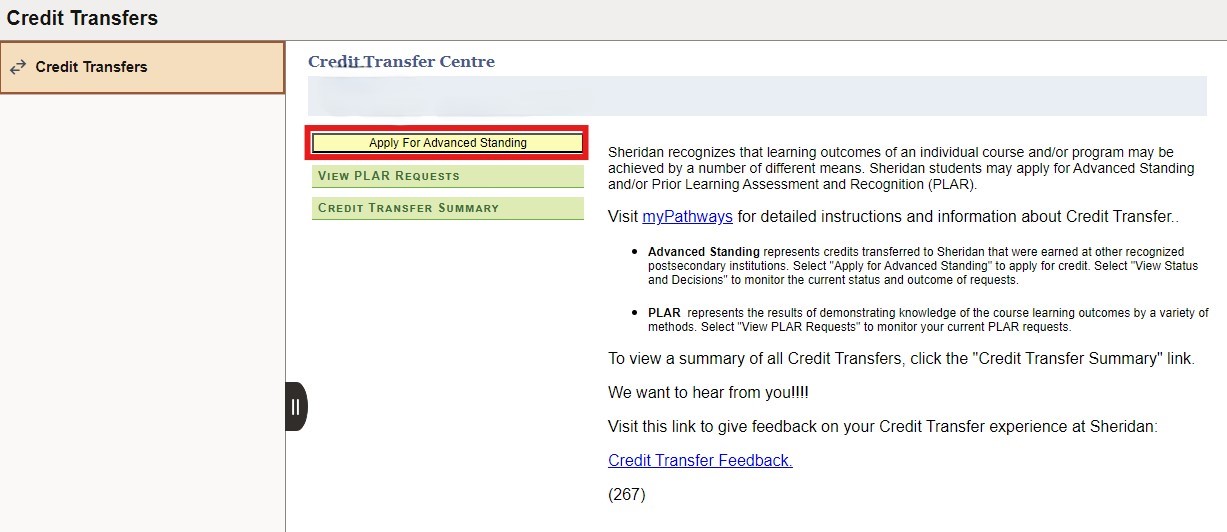
- Click the button Apply for Advanced Standing.
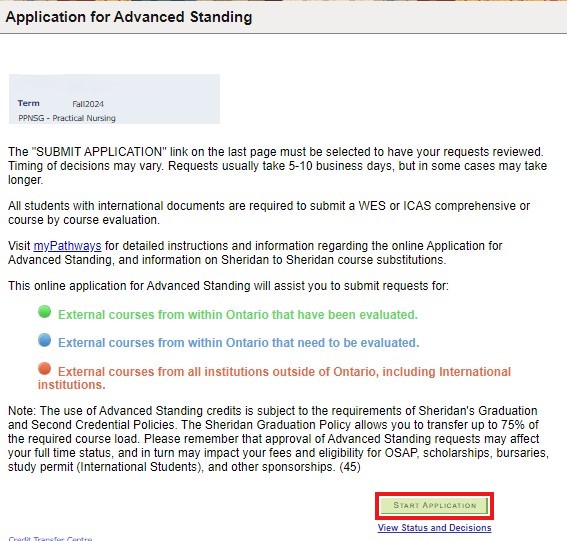
- Start your Application
You will see the Advanced Standing application options available to you. These can include:- External courses from Ontario that have already been evaluated
- External courses from within Ontario that need to be evaluated
- External courses from all institutions outside of Ontario, including international institutions
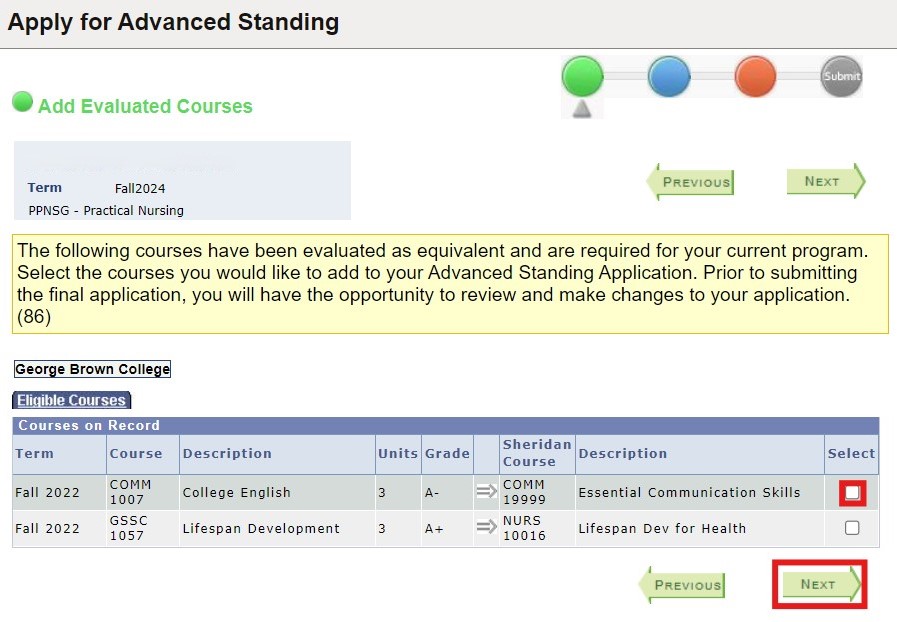
- Adding evaluated courses
If adding a course that has already been evaluated to your Advanced Standing application, simply check the check box under the “Select” column to select the relevant course(s) and click “Next”.
If you are only adding evaluated courses, click the Next button until you reach the end of the application and then Submit.
- Adding non-evaluated eligible courses
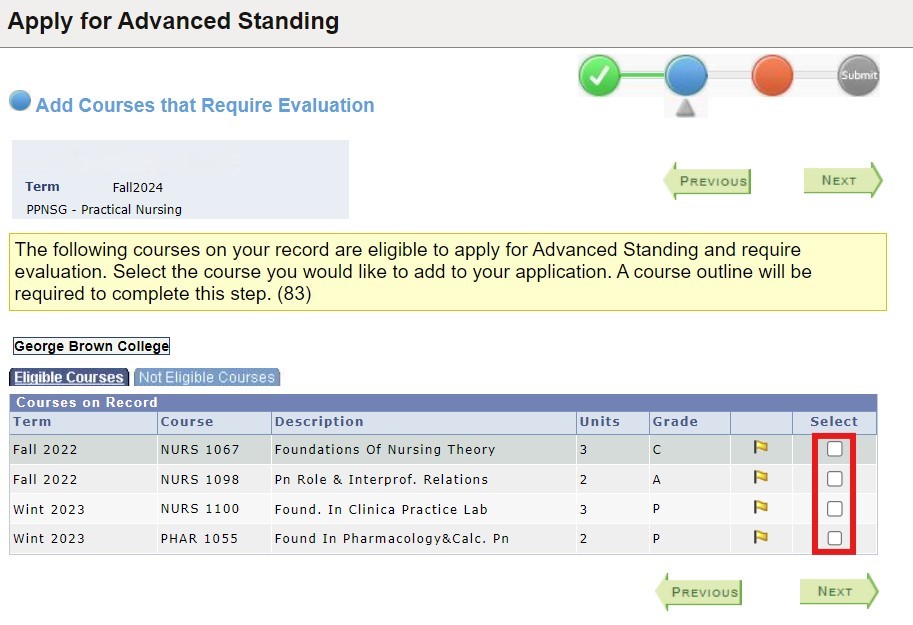
To add non-evaluated eligible courses check the check box under the “Select” column to select the course(s). You must provide a course outline, as well as the course code, course name, grade, semester/year taken, official grade on transcript and credit value. Click "Next" to proceed through the steps illustrated below.For courses older than five years, students may request advanced standing for courses regardless of when they were completed. However, Sheridan reserves the right to deny Advanced Standing requests for courses completed more than five years ago based upon current relevancy of course content.
- You will need to specify if each course is a Core course or a Gen-Ed/ Breadth elective. Choose the
appropriate option under the “Request Type" column.
You may only select one course at a time.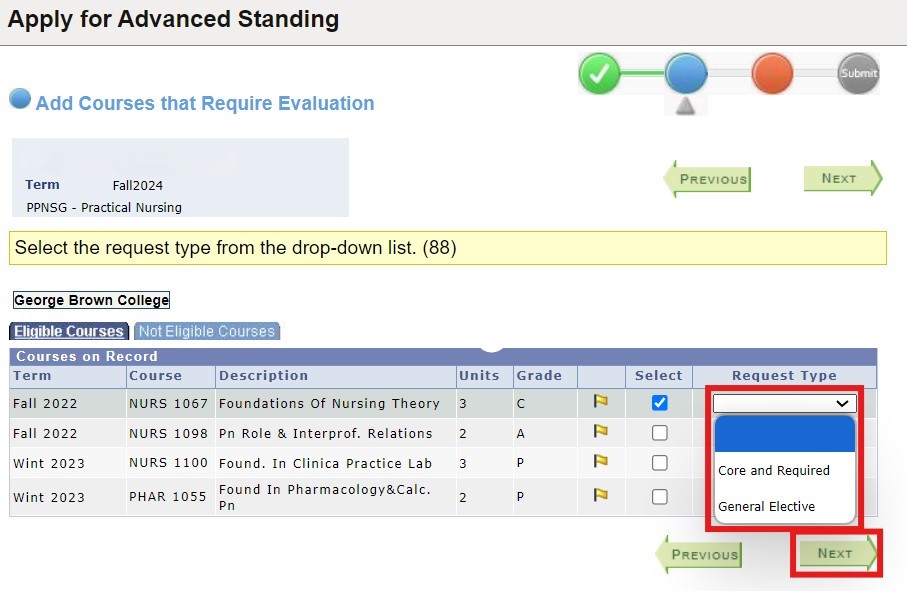
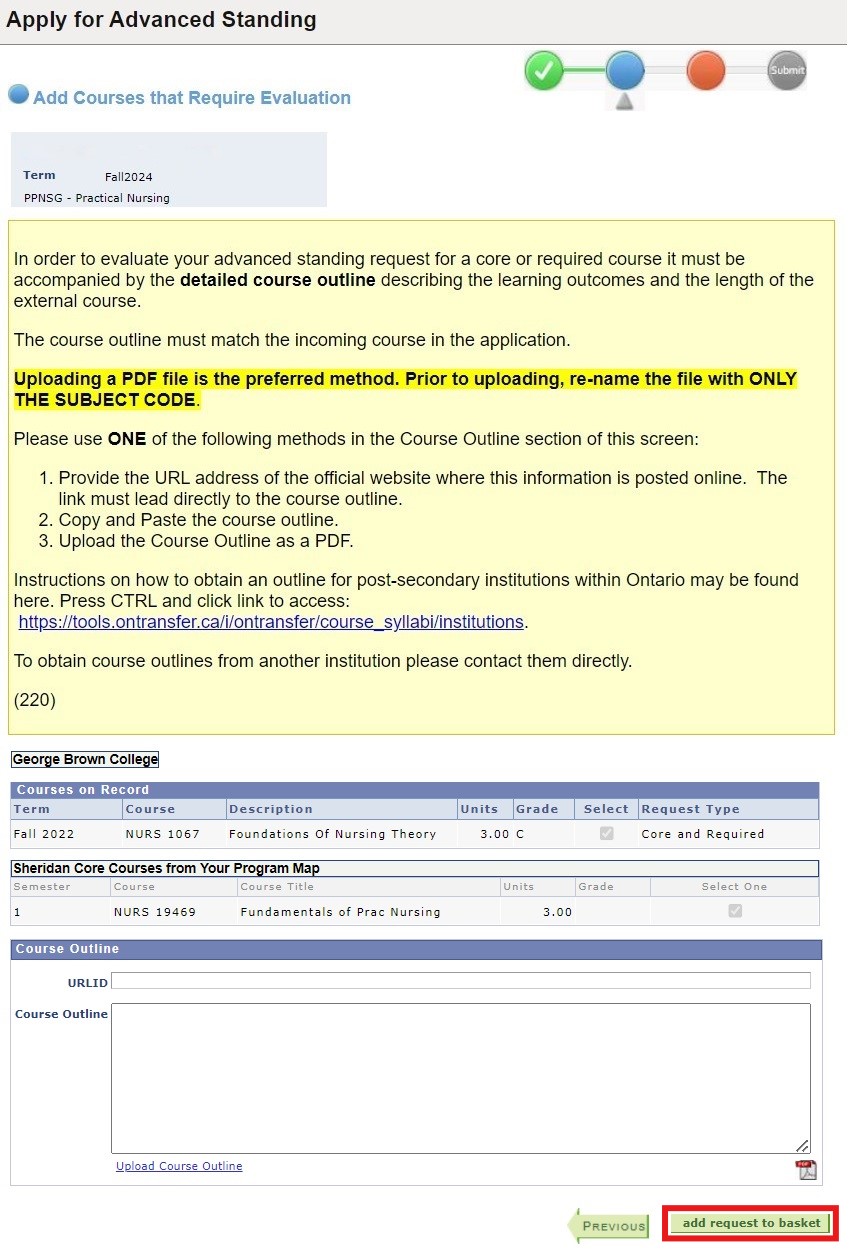
- When applying for Advanced Standing for a non-evaluated course you must include a detailed course
outline documenting the learning outcomes and the length of the external course. You can do this by
either:
- Uploading the course outline as a PDF or .DOC format (preferred)
- Providing the URL address of the official website where this information is posted
- Copying and pasting the course outline
- Add more courses or proceed to next stage
Once you have successfully added a course to your Advanced Standing application, the number of requests in your application will be displayed in the top right portion of your screen (see image in step 9). From this page you can either add additional courses or click “Next” to proceed to the next stage.
If you are only adding courses currently on your Sheridan record, proceed to Step 13. - Adding non-evaluated eligible courses
Click the Add School button to apply for advanced standing using your educational experience from institutions outside of Ontario.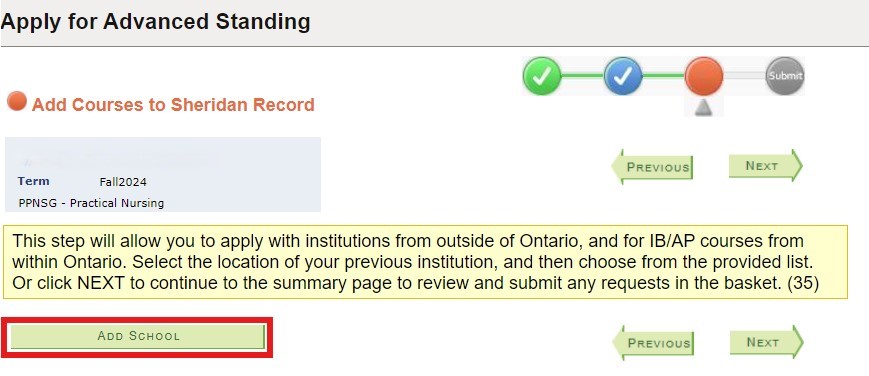
- Select a school from another Canadian province or International location.
Once you make your selection, you will be able to choose from the list of schools on screen. If your school is not listed, choose the Add School Not Listed button and enter the details.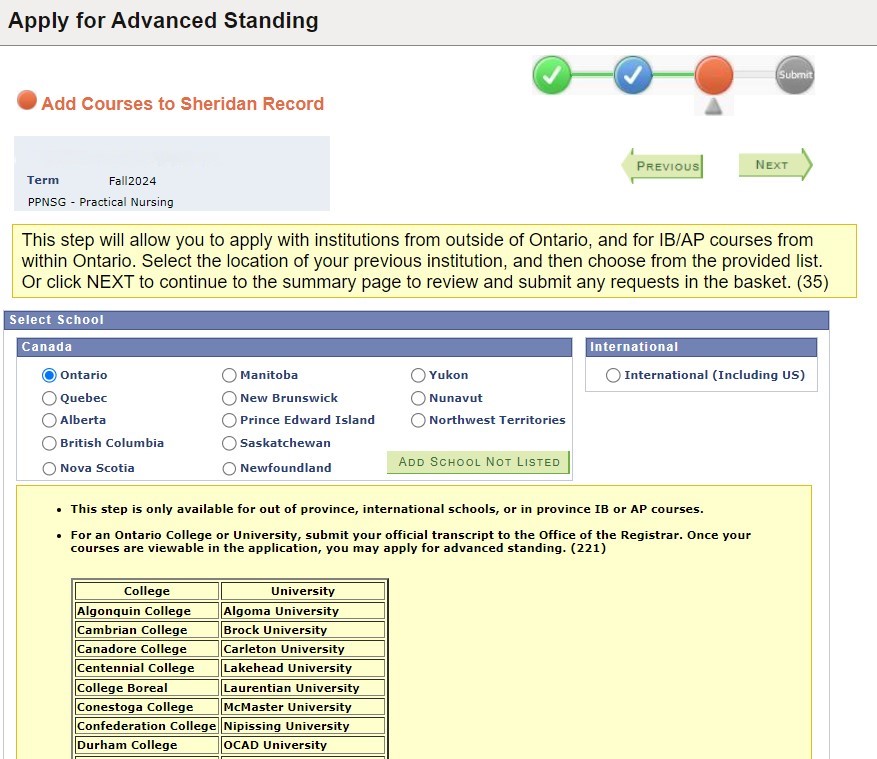
- Your chosen school will appear on the next screen. Choose the Add Course button to proceed.
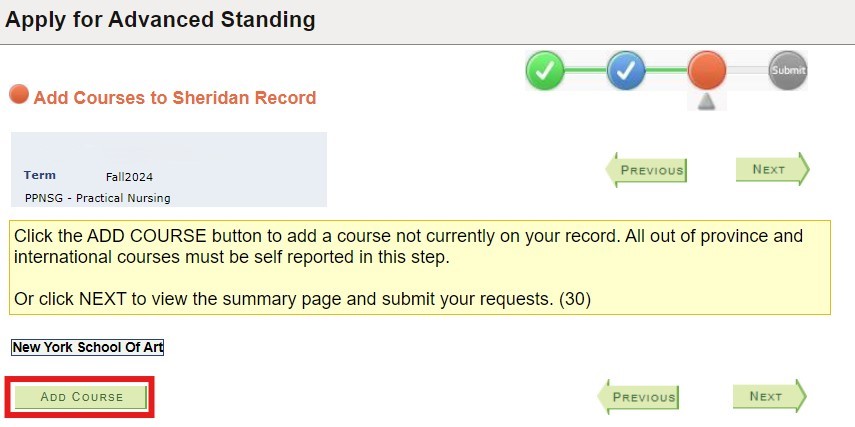
- Enter the course information requested on screen as illustrated below.
Please note: that Grade, Year Taken, Course Credits, Term and Course Title are mandatory fields. Your application can only be completed once the Office of the Registrar has received an official transcript or evaluation.
Click Add when done.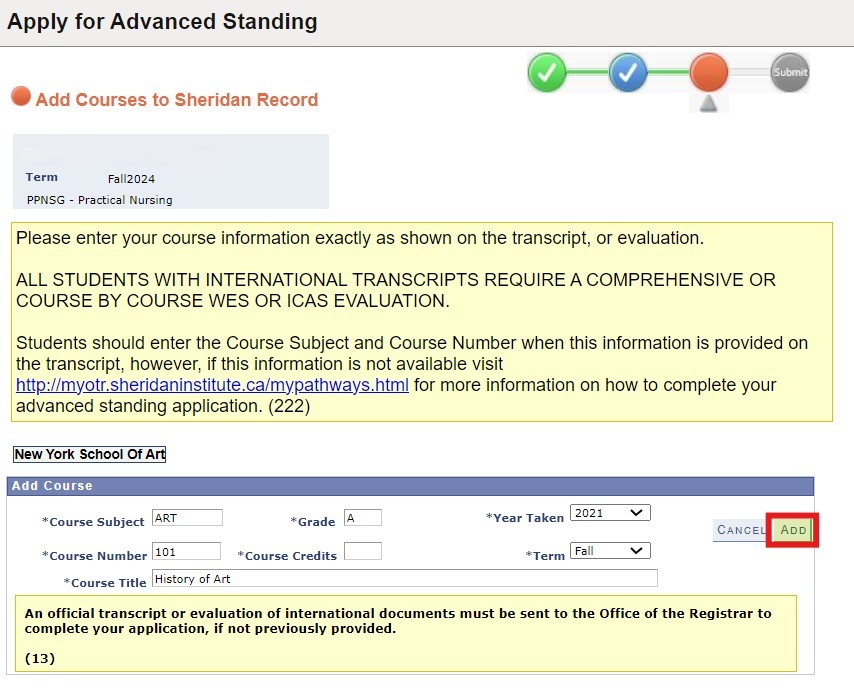
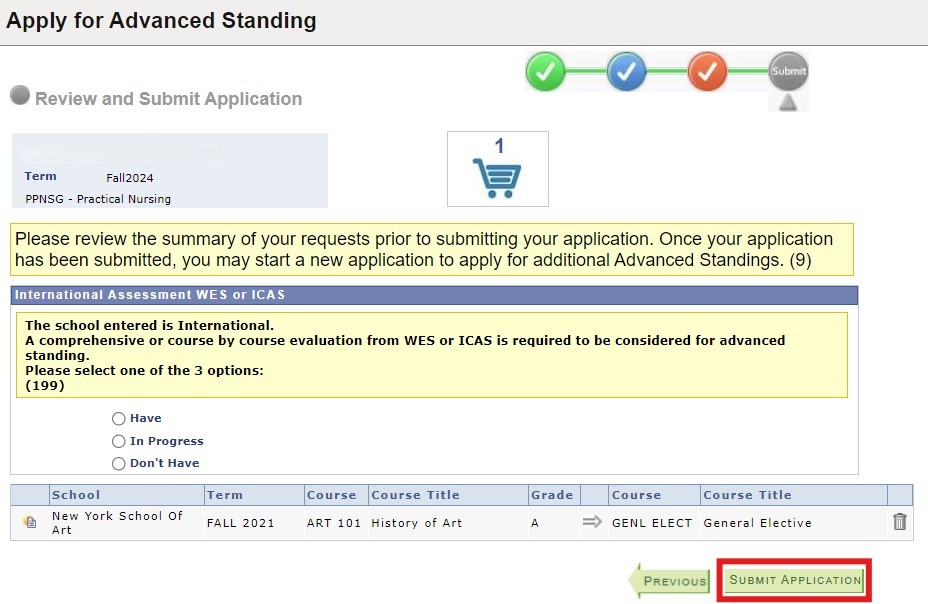
- Review your application. You can use the Previous button to step back and make any changes. Use the
trash icon to delete any entries you may want to remove. Click Submit Application once you are
ready to proceed.
- A pop up panel will confirm that your application for advanced standing has been successfully
submitted.
Click "OK" to dismiss the pop up.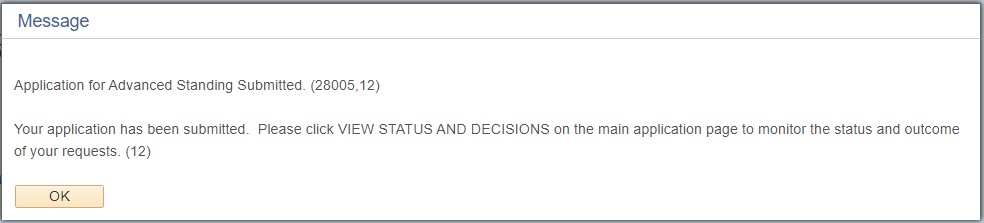
Requesting/Submitting Your Transcripts
New students: Use your Ontario Colleges account to add the institution in the education page, and then request a transcript to be sent to Sheridan.
If you no longer have access to your Ontario Colleges account, use the MyCreds™ service.
Official transcripts sealed in the original issued envelope may be dropped off in person to the Office of the Registrar – Admissions Office.
Prior Learning Assessment and Recognition (PLAR)
Prior Learning Assessment and Recognition (PLAR) is a challenge for credit process that recognizes and provides students and applicants with an opportunity to have their previous learning assessed and recognized by Sheridan.
Evaluation methods may include:
- written test
- standardized exam
- demonstration of competence
- criteria-based interview
- product assessment
- Simulation
- other
For complete details, you are strongly encouraged to review the Prior Learning Assessment & Recognition Policy and the Prior Learning Assessment & Recognition Procedure.
How to Apply
How to Apply
- Complete a PLAR Self-Assessment Form (click here to download) to determine if you are eligible to apply for PLAR.
- Email the form to the appropriate Coordinator or PLAR Advisor (i.e. Co-Op/Embedded Student Advisor). Contact the Credit Transfer and Pathways office at pathways@sheridancollege.ca for the designated contact information.
- The Coordinator/PLAR Advisor will review the form.
- If approved, the Coordinator/PLAR Advisor will initiate an online PLAR Request.
- Once an online PLAR Request is initiated, you will receive an email notification to your Sheridan Email.
- Monitor the Status of the PLAR Request(s) in your myStudent Centre:
- Login to myStudent
Centre
Click on the Credit Transfers tile in your dashboard
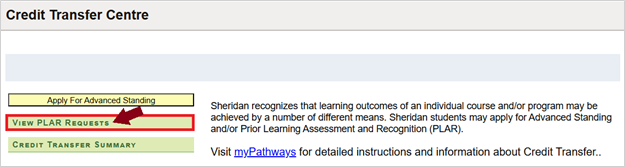
- Click the button View PLAR Requests
- Login to myStudent
Centre
- Review the Action Plan and Pay PLAR Fee(s)
- The Coordinator will assign a PLAR Assessor (which may also be the Coordinator or another
appropriate
faculty member). You will then receive an email notification to your Sheridan Email with the Action
Plan
(date, time, and challenge type) and payment instructions to submit the $108.99 PLAR
Fee(s).
NOTE: Separate payments of $108.99 must be made for each PLAR through Sheridan's Flywire payment portal.
Payments can take up to 10 business days to post. Your PLAR status will be “Pending Payment” until the payment is processed. If you have made a payment and your payment status has not updated after the estimated processing deadline, please contact pathways@sheridancollege.ca. Your PLAR Assessor will receive an email notification when payment is process. They cannot proceed with the Action Plan until payment is confirmed. - View your PLAR result(s) in myStudent Centre
- Once the PLAR process is complete, the PLAR Assessor will input your final grade, which will be reviewed and posted by the Credit Transfer and Pathways Team in the OTR.
- You will receive an email notification to your Sheridan email when your PLAR grade(s) have been posted. Go to myStudent Centre > View PLAR Requests (see step 3).
- If an ‘F’ grade is awarded, the ‘F’ grade will not be placed on your Student Record, but the application will count as a PLAR attempt.
- Appeals
Students may appeal decisions as per the Academic Appeals and Consideration Policy.
Frequently Asked Questions (FAQ)
I passed PLAR, but why is my grade is still showing as Failed/Incomplete/Withdrawn etc.?
You can confirm if your PLAR grade was posted by going to myStudent Centre > Credit Transfer Summary. If the grade shows there but not in your Academic Report, please submit a ticket via the Service Hub (click “Get Help”) to have a Record Specialist complete a PLAR Substitution to override the previous grade with your PLAR grade.
I paid for PLAR, but why is the status still showing “Pending Payment”?
If you have made a payment via online banking or have submitted a joint payment for multiple PLARs through online banking/CIBC/Flywire the system will not automatically recognize this as a PLAR payment. Please submit a ticket via the Service Hub (click “Get Help”) or email pathways@sheridancollege.ca.
Why can’t I see my PLAR Request in myStudent Centre?
Students cannot initiate a PLAR request – it must be initiated by the appropriate Coordinator or a PLAR Advisor. You will need to follow-up with the Coordinator (either your Program Coordinator, General Education Coordinator, or Breadth Coordinator) or a PLAR Advisor to determine if the course is eligible to start a PLAR Request on your behalf.
Sheridan to Sheridan Credits (Course Substitutions)
Sheridan to Sheridan credit equivalency is where a previously completed course with at least an 80% match is substituted in a new program to meet a requirement. To request a course substitution, the student must complete a Course Substitution form and email the appropriate coordinator – Program Coordinator, English Coordinator, Breadth Coordinator, or General Elective Coordinator – to make the request.
- Course Substitution form
Courses with the exact same course code (COMM 19999 for example), or electives that will meet the new program requirements will automatically be counted towards credit towards the new program. Students are encouraged to check their Academic Progress by clicking on the Academic Progress tile in their dashboard on myStudent Centre. In the left hand sidebar click on Academic Progress to view any completed courses that are being used for the new program.
Please note: Students should continue to attend classes until official notification that the course substitution has been approved. If the course substitution is approved, and reduces your course/credit load to less than 60%, it will affect your eligibility for OSAP. Check with the Financial Aid Office if you are uncertain of your eligibility. The original grade received will be counted in the GPA calculation of the program the course is transferred to.
What is the difference between course equivalency and substitution?
How is it different from Advanced Standing?
The original course is approved as a substitution. The grade earned is used in GPA calculation.
Block Transfers
In addition to a number of exciting pathways between its own programs, Sheridan has transfer agreements with universities and colleges around the world.
A Sheridan diploma may also lead to admission into a degree program. For more information, visit sheridancollege.ca/admissions/pathways-and-transfers or visit ontransfer.ca for a guide to credit transfers between Ontario colleges and universities.
Transferring Credits
Institutions typically grant transfer credit based on the following:
- The compatibility of your diploma studies with the program you wish to enter.
- Your overall academic average at Sheridan and, in some cases, your individual course marks.
Students usually need to complete more than one year of study at Sheridan to be eligible for transfer credit(s). Some institutions grant “block transfer credit” based on the length of your studies. Other institutions assess transfer credit on a course-by-course basis (advanced standing). It’s important that you check with the Admissions Office.
General Education to Degree Breadth
Eligibility
To be eligible for Block Transfer of credit towards Degree Breadth, General Education courses must be assigned a minimum of 3.0 credit hours per course and not given credit consideration towards core degree programs of study.
Block Transfer for 2 General Education Courses (6.0 credits)
Prior credit for 2 General Education courses with a minimum CGPA of 3.0, where the student has earned a minimum grade of 60% (C) in each course, will be awarded a credit equivalence of 1 Degree Breadth course. Credits acquired through this block transfer arrangement serve to satisfy general introductory breadth credit in a broad field of study (Humanities, Social Science, Global Culture, Mathematics, or Science) at the degree level.
Block Transfer for 3 General Education Courses (9.0 credits)
Prior credit for 3 General Education courses with a minimum CGPA of 3.0, where the student has earned a minimum grade of 60% (C) in each course, will be awarded a credit equivalence of 2 Degree Breadth courses. Credits acquired through this block transfer arrangement serve to satisfy general introductory breadth credit in a broad field of study (Humanities, Social Science, Global Culture, Mathematics, or Science) at the degree level.
Block Transfer for 4 General Education Courses (12.0 credits)
Prior credit for 4 General Education courses with a minimum CGPA of 3.0, where the student has earned a minimum grade of 60% (C) in each course, will be awarded a credit equivalence of 3 Degree Breadth courses. Credits acquired through this block transfer arrangement serve to satisfy general introductory breadth credit in a broad field of study (Humanities, Social Science, Global Culture, Mathematics, or Science) at the degree level.
Note: While credits acquired through a block transfer arrangement may not serve to fulfill a course-specific prerequisite requirement, such credits do serve to satisfy the requirements of the breadth policy at the introductory level in each of the designated fields of study.